


Multi-currency conversion feature
With our multi-currency conversion feature, players can automatically complete currency exchanges.
Players must use this option if they want to play in a currency that is not their default.
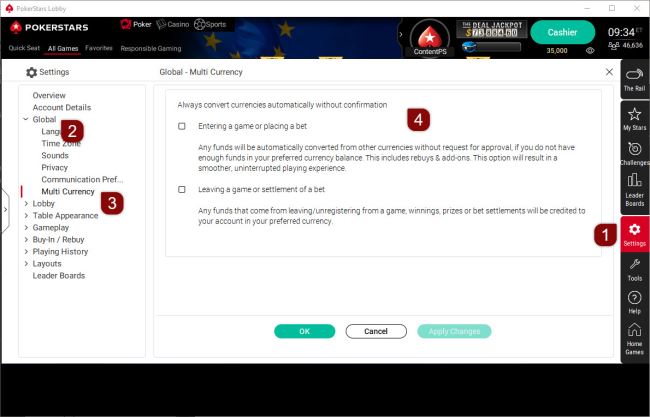
Desktop software
- Settings
- Global
- Multi Currency
- Always convert currencies automatically without confirmation.
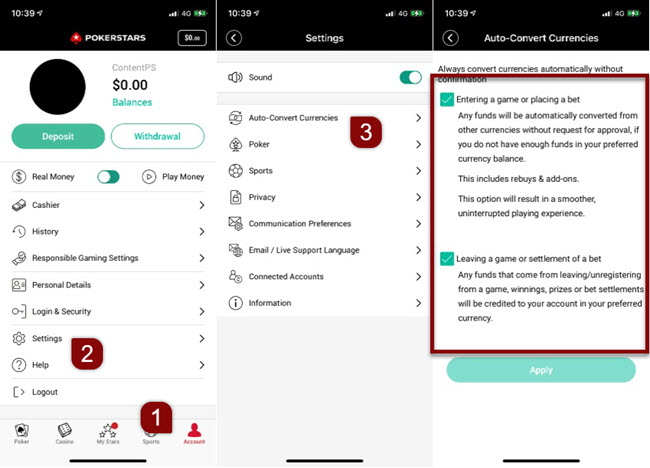
Mobile app
- Account
- Settings
- Auto-Convert Currencies
If you are on the website version of our help center:

Once users have opened the multi-currency window, they will be prompted with the following options:
- Entering a game or placing a bet: Any funds will be automatically converted from other currencies without the request for approval if they do not have enough funds in their preferred currency balance.
- Leaving a game or settlement of a bet: Any funds that come from leaving/unregistering from a game, winnings, prizes, or bet settlements will be credited to their account in their preferred currency.
If they check the first option mentioned, it will result in a smoother and uninterrupted playing experience.
Did you find this article useful?
Related Articles
- Deposits and Withdrawals: Available payment methods
- Missing games or software features
- A clean reinstall of our iOS app (deleting all data including app cache)
- Play Money top-up options
- Direct bank transfer withdrawals
- T-Money
- Connection issues: Try Google DNS
- Changing your account currency
- Transferring funds between currencies
- Chest types: locked and unlocked Chests explained