


Clearing the software cache to fix common PokerStars Cashier issues on the Windows software.
How do I clear the PokerStars software cache to fix Cashier issues on the Windows software?
Explains how to clear the PokerStars software cache on Windows to fix common Cashier issues.
When should I clear the PokerStars software cache?
Clearing the cache can help if you experience any of the following issues in the Cashier:
- A grey image with no text.
- The error message: 'Embedded browser error message - 7'.
- Nothing happens after pressing the Deposit button
If any of these occur, clearing the PokerStarsBrowserCache folder may resolve the issue.
How to clear the PokerStars software cache on Windows
Follow these steps: :
- Open the Windows 'Search' bar (usually bottom-left of your screen),
- Type or copy/paste the following path and press Enter:
%USERPROFILE%\appdata\local\temp\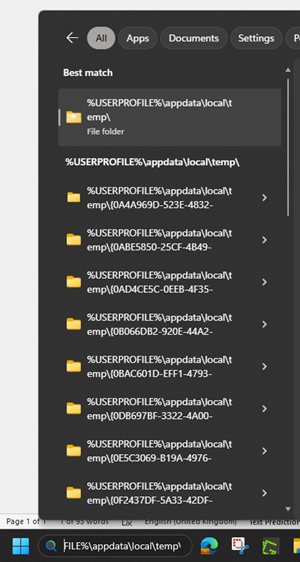
- Find and delete one of the following folders
- 'PokerStarsBrowserCache'
- 'PokerStarsBrCache'
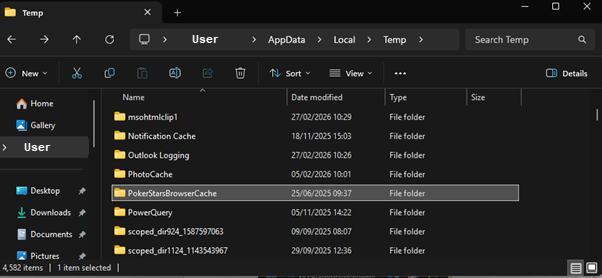
- Launch the PokerStars software again
- Open the 'Cashier' and try the action again.
Did you find this article useful?
Related Articles
- Why am I missing games or features on PokerStars?
- Common gambling myths and facts
- How to make a deposit
- How do I get free Play Money chips?
- Complete an interrupted game
- Why do I see unauthorized or duplicate card charges on PokerStars?
- Deposit with a card
- How do I use Interac for deposits and withdrawals?
- Fix lobby issues in the desktop software
- Game fairness and security on PokerStars